
Docs Search the docs
  1. Docs
  2. Estimate

Set rates and read the totals

Currency, GST, markup and costs, then the job's totals.

  • How-to
  • 2 min
  • Free and Pro
  • Checked with Fluah 1.0.34

Where to find it

Job settings

Steps

  1. Click Job settings, the gear by the tabs.

    Job settings, the gear by the tabs, marked
  2. Set the currency, GST %, MARKUP % and LABOUR RATE /h, then Save.
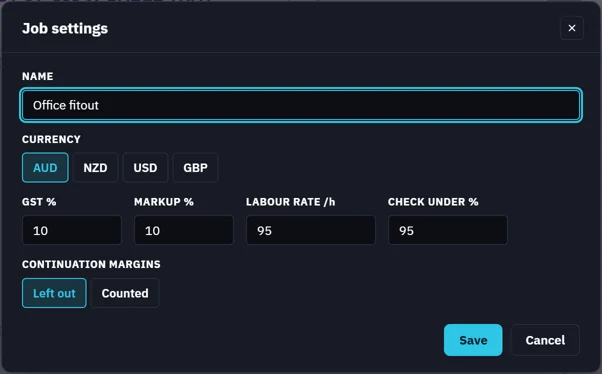
    Job settings: NAME, CURRENCY, GST %, MARKUP %, LABOUR RATE /h, CHECK UNDER %
  3. Double-click a measurement for its parts. + Part and + Labour add lines.
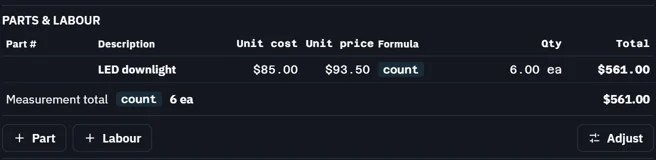
    LED downlight: its part at $85.00, 6 ea, $561.00; + Part, + Labour, Adjust
  4. Quantities in the worksheet has each line and the job's totals.
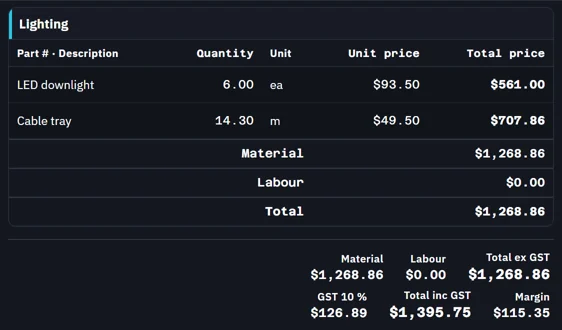
    Quantities: each line, then Material, Labour, Total ex GST, GST 10 %, Total inc GST and Margin
Was this page helpful?

Updated 6 November 2026